
I Can't Export My Price Book - Can I Still Use Print From Price Book App?
Don't have a price book you can export? No problem. Learn how to create a simple CSV file to use with the Print From Price Book app — and how to add barcodes to items that don't have one.
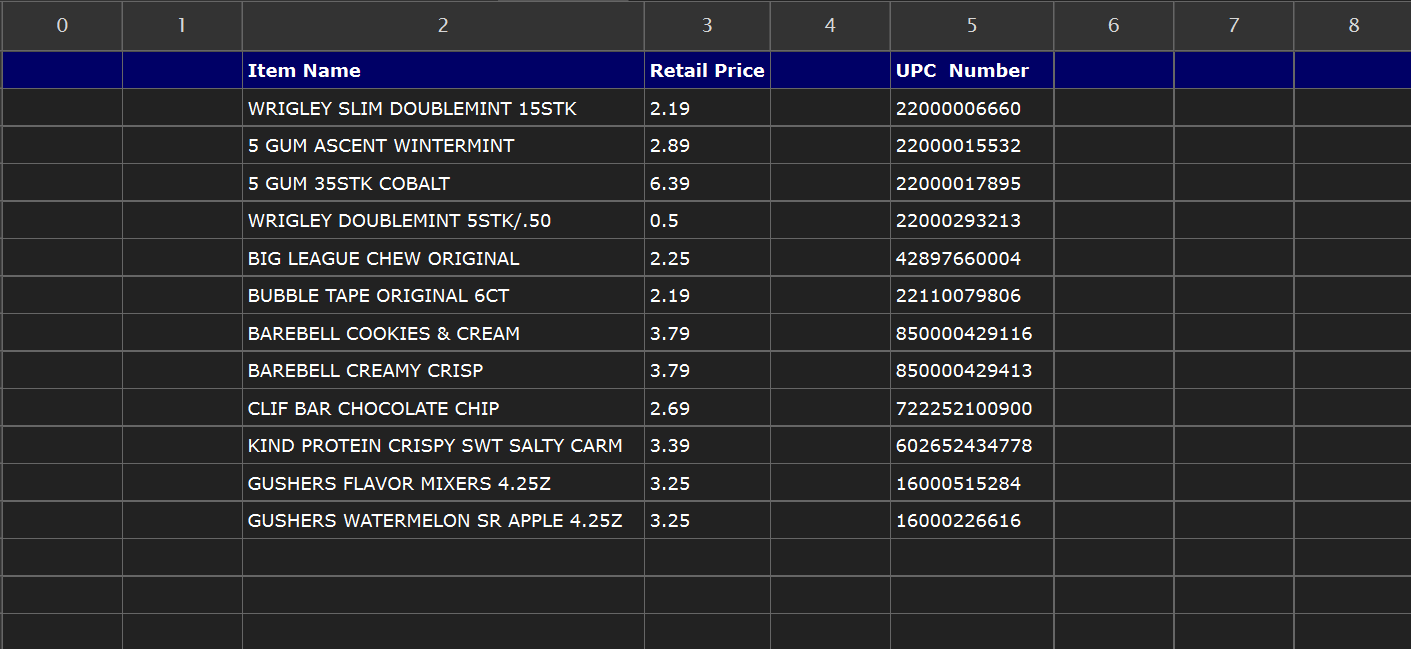
The short answer is yes — absolutely.
The Print From Price Book app was built around one core idea: your price book should work for the app, not the other way around. Whether you can export directly from your back-office system or you need to build your own file from scratch, you have everything you need to start printing shelf labels today.
What the App Actually Needs
The app only requires three pieces of information for each item:
Item Name — the name or description of the product
Retail Price — the selling price you want printed on the label
UPC / Barcode — the 12-digit barcode number for the item
That's it. As long as your file has a column for each of these three things, the app will work. It doesn't matter what else is in your file, how it's formatted, or whether it has extra columns of data you don't need. The app lets you map your columns yourself — so you just point it to the right ones and it takes care of the rest. There is no need to clean up your file, remove extra data, or reformat anything before uploading.
If You Can't Export From Your Back-Office System
Some back-office systems make it difficult or impossible to export a price book as a CSV file. If that's your situation, you can simply create your own CSV file manually and upload it to the app instead.
Creating a CSV file is easier than it sounds. You can build one in Modern CSV, Microsoft Excel, Google Sheets, or any spreadsheet application you already use:
Open a new spreadsheet
Create three columns — one for Item Name, one for Price, and one for UPC
Add an optional header row in the first row to label each column — this makes mapping even faster when you upload
Enter your items row by row — one item per row
Save or export the file as a CSV
That's your price book. Upload it to the app, map your three columns, and you're ready to print.
A Hidden Benefit — Adding Barcodes to Items That Don't Have One
This is where creating your own CSV file becomes especially powerful. Not every product that comes into your store arrives with a barcode. Loose items, bulk goods, store-branded products, or specialty items often have no UPC at all — which creates real problems at the register and in your inventory.
With the Print From Price Book app you can assign your own barcode number to any item, add it to your custom CSV file, and print a professional barcode label to apply to the product. Now that item is scannable at checkout, trackable in your inventory, and consistent across every shelf in your store.
This gives you several important advantages:
Faster checkout — cashiers can scan instead of manually entering prices
Accurate inventory counts — every item is trackable by barcode
Consistency — every product on your shelf has a uniform, professional label
Professional appearance — your store looks organized and well-managed to customers
Whether you are filling in gaps in your existing price book or building one from the ground up, the Print From Price Book app gives you the flexibility to work with what you have — and the tools to fill in what you're missing.